
Applies natural-looking motion blur by automatically tracking every pixel.
ReelSmart Motion Blur in Action
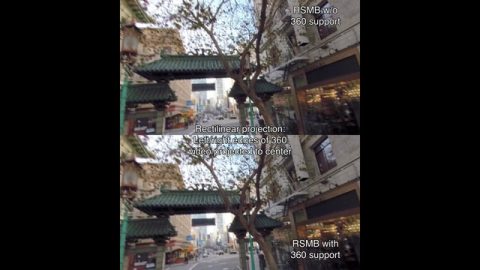
RSMB 360 Demo
RSMB uses optical flow tracking on 360 footage taking into account the connectedness of the left and right sides of the 360 video, as well as the top and bottom.
ReelSmart Motion Blur in Action!
See what ReelSmart Motion Blur® can do for you!
Thanks to the following people
* Patrick Boivin for stop-motion
* Patrick Goski (Maxon,net) for 3D motion graphics example
* TMS Consulting and Baylor University Film and Digital Media department for Dance Sequence

The Fighter
Work by Comen VFX. RSMB was used to give a more filmic look to footage shot on video, providing shutter speed correction. The footage looked choppy when played back at film rates. So the client settled on RSMB to simulate that normal shutter speed you would have with film footage. Read More.
Computer Arts Magazine gives ReelSmart Motion Blur a 5-star review and calls it "a brilliant plug-in which should be in every user's toolbox."
CreativeMac.com says ReelSmart Motion Blur "lives up to and surpasses expectations, so we're giving it a Best Buy recommendation."
ReelSmart Motion Blur Features
Fast and easy motion blur!
Applies motion blur based on automatic tracking of every pixel.
Essential for 3D
Ability to blur with motion vectors supplied by your 3D system.
Pro version also available
RSMB Pro also available. See Fusion Studio page for details.
Automatic Tracking
Automatic tracking of every pixel from one frame to the next
Fine Tune
Variable amount of blur
Removal of Motion Blur
Blur can also be removed!
360 Motion Blur
RSMB tracks 360 footage and blurs properly taking into account the connectedness of the edges of the sides as well as top top and bottom.
Object Separation
Support for foreground and background separation using a specified matte. ReelSmart Motion Blur then uses proprietary filling and tracking techniques when working on the background layer, even when it is obscured by the foreground!
3D Motion Vector Input
Ability to blur with motion vectors supplied by you... which, most likely, will come from your 3D animation system.
RGB+A Tracking
An option that uses the alpha channel to help tracking of dark images with mattes. This is especially useful for CG, masked and/or keyed material.
RGB+A Tracking
An option that uses the alpha channel to help tracking of dark images with mattes. This is especially useful for CG, masked and/or keyed material.
Track Point Guidance
Up to 12 user-defined points can be specified to help guide RSMB's motion estimation. By using the tracking points you can explicitly tell RSMB where a pixel moves from one frame to the next in order to guide RSMB's calculation of motion vectors.
Track Point Guidance
Up to 12 user-defined points can be specified to help guide RSMB's motion estimation. By using the tracking points you can explicitly tell RSMB where a pixel moves from one frame to the next in order to guide RSMB's calculation of motion vectors.
Spline Guidance
When RSMB exhibits tracking problems, you can guide RSMB by simply creating and animating shapes to show where objects are actually moving.
Spline Guidance
When RSMB exhibits tracking problems, you can guide RSMB by simply creating and animating shapes to show where objects are actually moving.
GPU accelerated
This product is GPU accelerated. Read more.
GPU accelerated
This product is GPU accelerated, and will use more than one GPU provided they are the fastest GPUs on the machine and are of the exact same type. Read more.
PRO Features
All PRO features supported in Fusion page of Resolve. Fusion features descriptions and native plug-ins also supported and available for download on our Fusion Studio page.
Learn how to use ReelSmart Motion Blur’s features
Instructional videos, and example videos, that help you learn how to get the most of each plug-in's robust features.