
The ultimate blurring filter set that combines user directed controls and feature sensitive methods.
SmoothKit in Action
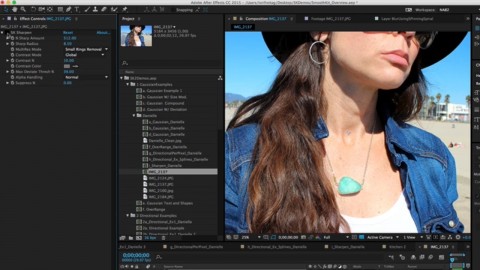
SmoothKit Overview
SmoothKit is a set of feature-sensitive blurring and sharpening filters.
See what SmoothKit can do for you!

Starry Eyed Surprise – featuring Shifty
A base pass of SmoothKit created a dreamy effect. Then line animation was added on top and processed by SmoothKit to create an “energy wave”.
Music Artist: Paul Oakenfold
Director: Laura Kelly, Production Co.: Partizan
© 2003 Maverick Recording Company

Dreamkeeper
SmoothKit was used to help create the swirly atmospheric effects in the background. More Info.
Production Company: Hallmark Entertainment
Post Production House: Glassworks
Visual Supervisor: Nick Brooks
© 2003 Hallmark Entertainment Distribution, LLC.
SmoothKit Features
More options
SmoothKit is a set of blur and sharpen filters that complements and extends the features of basic blurs and sharpens usually provided.
Retain features
Blur without over-softening important features and edges. Emphasis is on precise control with no compromise on image quality.
Better sharpening
SmoothKit sharpens with much less ringing, using a proprietary sharpening algorithm.
Feature Specs
Preserve Edges
Soften areas while preserving sharp edges.
Choose what to process
Selectively filter the luminance, or the chrominance, or each of the RGB channels independently.
Sharpen
Sharpen plugin with a proprietary technique that significantly reduces usual sharpening ringing artifacts.
Reduce staircasing
Includes a jaggie-reducing filter, to help eliminate staircasing.
Better median filter
Get much less blocky results with SmoothKit's median filter.
Compound blur
Optional grayscale images may be used to modify blur size on a pixel-by-pixel basis.
Splines to control blur direction
Ability to use splines to control the direction of the blur at each pixel.
Blur using provided directions
Directional filtering with per-pixel direction and strength controls.
Block artifacts
Intelligently reduces block artifacts in MPEG or other compressed footage.
Temporal filter
Multi-frame (temporal) filtering with several useful processing modes.
Depth of field
Z-blur uses depth maps for blurring control. Ability to change where the focal point should be.
Learn how to use SmoothKit’s features
Instructional videos, and example videos, that help you learn how to get the most of each plug-in's robust features.