
Applies natural-looking motion blur by automatically tracking every pixel.
ReelSmart Motion Blur in Action
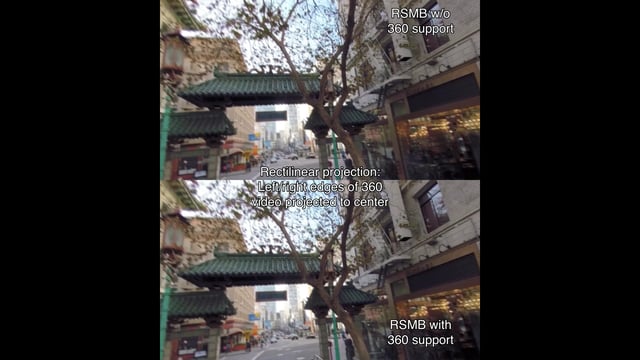
RSMB 360 Demo
RSMB uses optical flow tracking on 360 footage taking into account the connectedness of the left and right sides of the 360 video, as well as the top and bottom.
ReelSmart Motion Blur in Action!
See what ReelSmart Motion Blur® can do for you!
Thanks to the following people
* Patrick Boivin for stop-motion
* Patrick Goski (Maxon,net) for 3D motion graphics example
* TMS Consulting and Baylor University Film and Digital Media department for Dance Sequence

The Fighter
Work by Comen VFX. RSMB was used to give a more filmic look to footage shot on video, providing shutter speed correction. The footage looked choppy when played back at film rates. So the client settled on RSMB to simulate that normal shutter speed you would have with film footage. Read More.
Computer Arts Magazine gives ReelSmart Motion Blur a 5-star review and calls it "a brilliant plug-in which should be in every user's toolbox."
CreativeMac.com says ReelSmart Motion Blur "lives up to and surpasses expectations, so we're giving it a Best Buy recommendation."
ReelSmart Motion Blur Features
Fast and easy motion blur!
Automatic Tracking
Fine Tune
Removal of Motion Blur
360 Motion Blur
RGB+A Tracking
GPU accelerated
Learn how to use ReelSmart Motion Blur’s features
Instructional videos, and example videos, that help you learn how to get the most of each plug-in's robust features.
Download
Try ReelSmart Motion Blur for Free
ReelSmart Motion Blur V6 – OFX Hosts
ReelSmart Motion Blur V6 – OFX Hosts
TRIAL DOWNLOAD & LICENSE COMPATIBILITY
When you download a ReelSmart Motion Blur or purchase a ReelSmart Motion Blur license for Vegas Pro it is compatible with the following:
Autograph
autograph (all versions)
Baselight
5.2.11675 (and up)
Catalyst Edit
2015.1.0.104 (and up)
Diamant and Dustbuster+
12.0 (and up)
Flame
2019.2 (and up)
Fusion Studio
5.2 (and up)
HitFilm
3.0.0.0576 (and up)
Mistika
8 (and up)
Natron
1 (and up)
Nucoda
2014 (and up)
Nuke
5.1 or Indie 12.2 (and up)
Resolve
11 (and up)
Scratch
4 (and up)
Silhouette
6.1.3 (and up)
Vegas Pro
64-bit only, v10.0e (and up)
ReelSmart Motion Blur V5 – OFX Hosts
ReelSmart Motion Blur V5 – OFX Hosts
TRIAL DOWNLOAD & LICENSE COMPATIBILITY
When you download a ReelSmart Motion Blur or purchase a ReelSmart Motion Blur license for Vegas Pro it is compatible with the following:
Catalyst Edit
2015.1.0.104 (and up)
HitFilm
3.0.0.0576 (and up)
Natron
1 (and up)
Nucoda
2014 (and up)
Nuke
5.1 or Indie 12.2 (and up)
Resolve
11 (and up)
Scratch
4 (and up)
Silhouette
6.1.3 (and up)
Vegas Pro
64-bit only, v10.0e (and up)
ReelSmart Motion Blur V4 – Movie Studio, Vegas Pro
ReelSmart Motion Blur V4 – Movie Studio, Vegas Pro
TRIAL DOWNLOAD & LICENSE COMPATIBILITY
When you download a ReelSmart Motion Blur or purchase a ReelSmart Motion Blur license for Vegas Pro it is compatible with the following:
Vegas Pro
64-bit only, v10.0e (and up)
Purchase ReelSmart Motion Blur
License for Vegas Pro
License works with After Effects, Autograph, Catalyst Edit, Diamant and Dustbuster+, Final Cut Pro, HitFilm, Motion, Natron, Premiere Pro, Resolve, and Vegas Pro.
Upgrades: Upgrade requires a previous license of same product. Please do not order an upgrade unless you already own an older version of the same product. If you are unsure please contact sales@revisionfx.com and we can check for you. Please provide the license registration or server ID (for floating license upgrades) from which you are upgrading for faster processing.
Render-Only: Requires a full license, this is meant for hosts applications that support render-farm type processing. See our licensing FAQ: